Blender is software for creating and working with two- and three-dimensional digital content. A single Blender project can contain the geometry of objects, their surfaces and textures, lights, cameras, animation, simulations, compositing instructions, and the settings used to turn that scene into still images or video.
What Blender Is
Blender is often introduced as a 3D modeling program, but modeling is only one part of it. It is better understood as an integrated creation suite: an artist can build an object, give it materials, arrange it in a scene, animate it, render it, composite the result, and even edit the resulting video without leaving the application.
The software is free and open source. Its source code is distributed under the GNU General Public License, while the artwork people create with Blender is not automatically placed under that same license. Blender’s development is coordinated through the Blender Foundation and the broader Blender project.
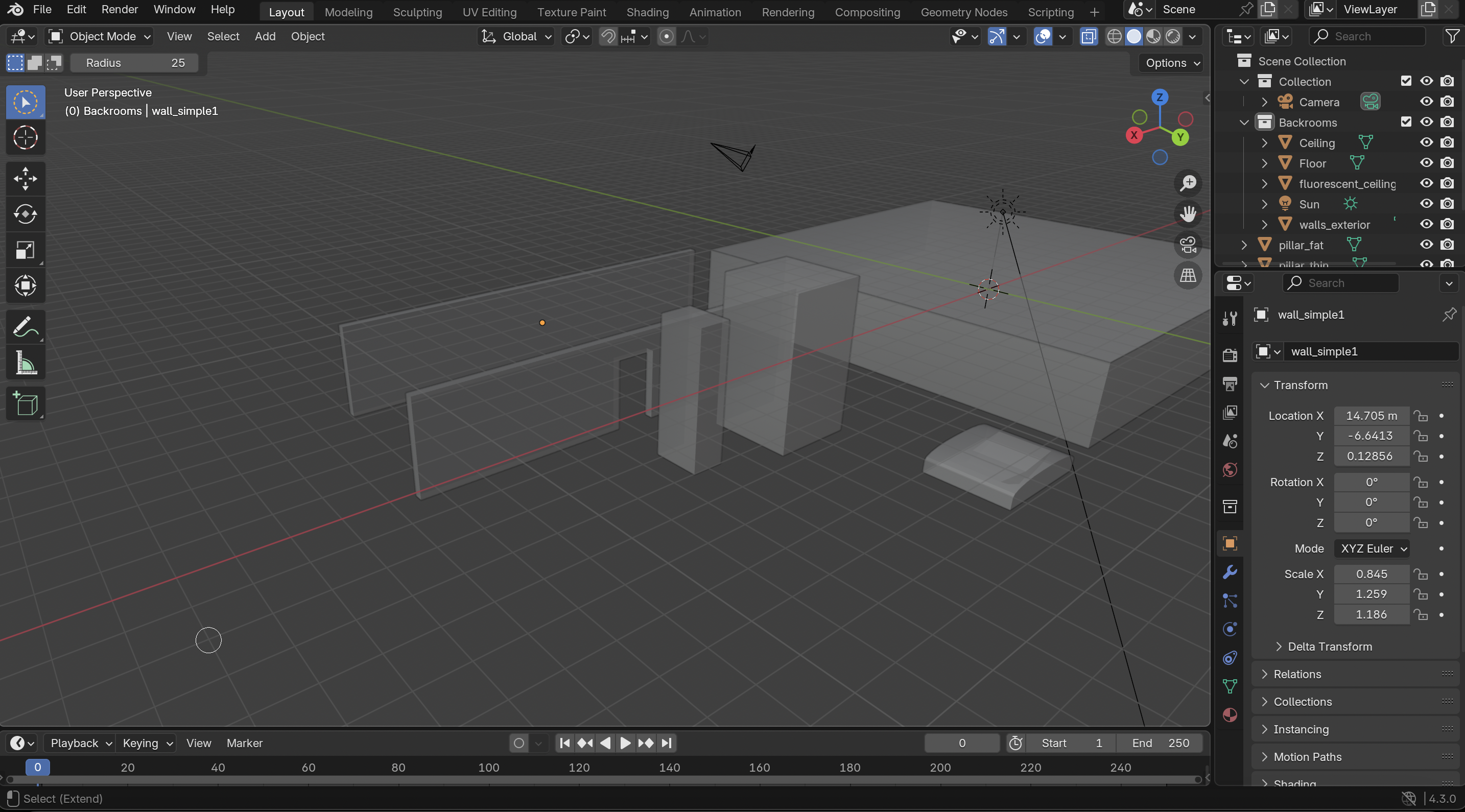
How a Blender Scene Fits Together
A Blender scene is a structured collection of things that can be viewed, changed, reused, and related to one another.
Objects
Scene-level items with a position, rotation, and scale. Meshes, cameras, lights, curves, text, and armatures can all appear as objects.
Data
The underlying information an object uses. A mesh object, for example, refers to mesh data made from vertices, edges, and faces.
Materials and textures
Instructions and image data that help determine how surfaces react to light and what details appear across them.
Cameras and lights
Cameras establish a rendered viewpoint; lights help define visibility, mood, color, shadows, and the form of the scene.
Core Workflows
People enter Blender through different tasks, but the workflows regularly overlap. A model may begin as simple geometry, be sculpted into a more organic form, receive procedural materials, and then be rigged and animated.
- Modeling
- Constructing and editing geometry, from simple hard-surface objects and architecture, to detailed characters and environments.
- Sculpting
- Shaping digital forms more like clay, usually with brushes and progressively finer surface detail.
- Materials and shading
- Defining the visual behavior of surfaces, often through connected nodes that describe color, roughness, transparency, emission, and other properties.
- UV mapping and texturing
- Relating a model’s surface to a two-dimensional layout so images and painted details can be placed predictably.
The Viewport and the Render
The 3D viewport is the interactive workspace where a person navigates the scene and changes it. It can show fast solid previews, material previews, wireframes, or rendered shading. A render is the calculated output produced from a camera using a render engine and the project’s chosen settings.
This distinction matters because a scene can feel responsive while it is being edited, yet take much longer to render at high quality. Geometry density, lighting, materials, simulations, image resolution, hardware, and render settings can all affect speed and memory use.
Interactive work
Viewport
Optimized for navigating, selecting, editing, testing, and previewing while a project is still in motion.
Calculated output
Render
Produces a still or animation frame from the active camera, using an engine such as Eevee or Cycles.
Animation, Simulation, and Effects
Blender can change object properties over time through keyframes, constraints, drivers, armatures, and other animation systems. It also includes tools for simulations and effects involving particles, cloth, rigid bodies, fluids, hair, and procedural motion. The exact technique depends on whether the creator needs direct artistic control, physically inspired behavior, or a mixture of both.
Grease Pencil adds a drawing-oriented system that can be used for 2D animation, storyboarding, annotations, and hybrid 2D/3D work. Compositing nodes can then combine render layers and make image-level adjustments after the 3D scene has been rendered.
Procedural Tools, Python, and Add-ons
Blender is extensible. Its Python API can automate repetitive work, generate or modify scenes, build custom tools, and connect Blender to larger production pipelines. Add-ons package extra behavior into reusable extensions, while node-based systems let creators construct visual networks for materials, compositing, and procedural geometry.
This is one reason Blender is useful to both artists and programmers: the same scene can be shaped manually, procedurally, or through code. The approaches can reinforce one another rather than belonging to separate applications.
Strengths and Learning Curve
Blender’s breadth is a major strength: one freely available application covers many stages of digital production and can be customized deeply. That breadth also creates a steep learning curve. A beginner must learn not only buttons and shortcuts, but also the underlying distinctions between objects and data, viewport previews and final renders, materials and textures, local and global coordinates, destructive and non-destructive editing, and many other connected ideas.
Learning becomes easier when Blender is approached through a small concrete goal— such as modeling one room, lighting one object, or animating one simple motion —while gradually learning the larger system that surrounds it.
Blender in Aaron Schlossberg’s Universe
Blender is used in developing 3D environments for my project, Fiction2Reality, including Backrooms-related spaces. Blender also appears inside my short story Just This Once, where a student is seen building a meticulously modeled old house in the school’s tech room.
That reference is a small example of the connection the Info Sprawlings is meant to preserve: a real creative tool can have its own explanatory knowledge page while also linking outward to the fictional (or expostory) writing, projects, and ideas in which it appears.
Sources and Further Reading
- About Blender: Blender’s official overview and mission.
- Blender License: official explanation of Blender’s GPL licensing and created artwork.
- Blender Manual: the official reference for Blender’s interface and tools.
- Blender History: an official history of the project and its open productions.